

Core Concepts
Tasks
A task is one unit of work: a change you can describe, an agent can build, and your team can approve. Everything on the board is a task.
New here? Ship Your First Task covers your first change end to end.
How a task moves
| Column | Meaning | Moves when |
|---|---|---|
| Todo | Ready to start | You create it |
| In Progress | An agent is building it | An agent starts work on it |
| In Review | A pull request is waiting for review | An open, non-draft pull request is linked and no agent run is still working |
| Done | Merged into the base branch | The pull request is merged |
Gleamrun makes these moves automatically. A pull request (PR) is the finished change, packaged for approval. Merge it from the Review Hub or your git provider, or enable auto-merge.
A task that touches several repositories opens one PR per repository. It turns Done once at least one PR has merged and every other PR is merged or closed. Closing a PR without merging does not move the task.
There's also a Backlog status for ideas you're not ready to start.
Backlog tasks appear only in the list view, not on the board. Workspace owners and admins can restore deleted tasks from Workspace Settings → Archived. Otherwise, clear the board filters.
Task details
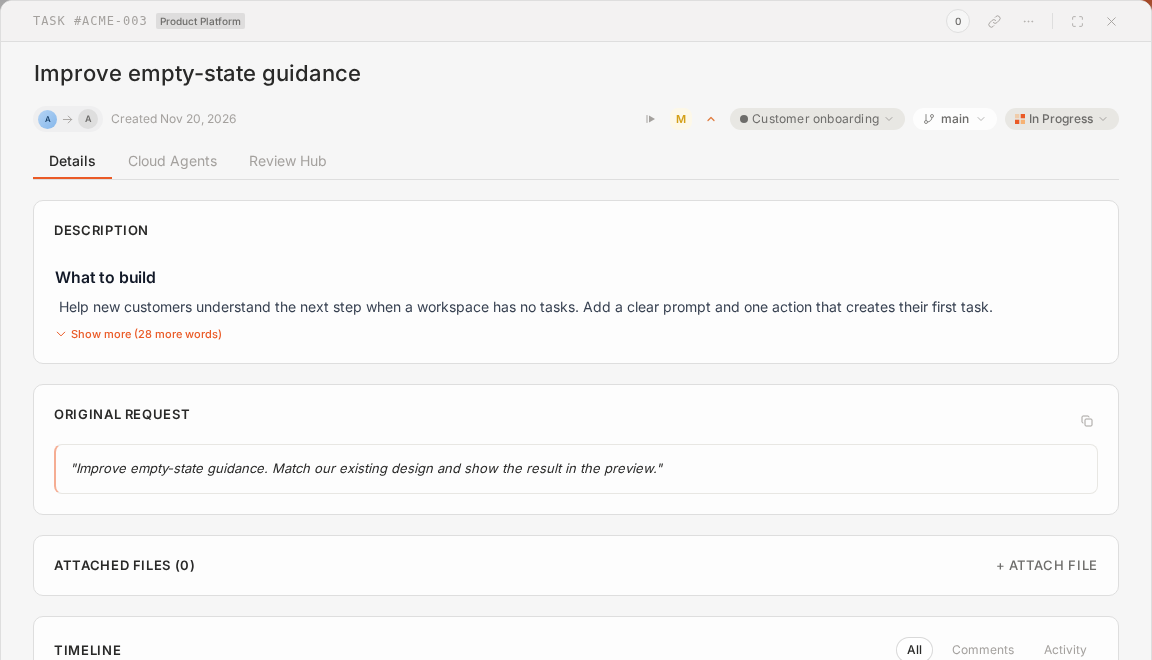
Clicking a card on the board opens the task's agent session, or, before an agent has run, the task with Start agent. To open the task details, select the card with the arrow keys and press Enter, open the task's link, or find it in the command palette. Task details open on the tab that fits the status: Cloud Agents while In Progress, Review Hub in In Review or Done, and Details otherwise.
- Details: the fields and sections on this page.
- Cloud Agents: the live agent session and preview once you press Launch Agent.
- Review Hub: checks, reviews, and verification evidence. Use Link PR there to attach an existing pull request. See Review & Merge.
Open Review Hub for the pull request, checks, and the agent's verification evidence. Test the change in the live preview under Cloud Agents, then merge from the Review Hub.
Title, people, and properties
- Title: click to edit. The task number (e.g.
#BOOK-014) in the top bar is the task's permanent reference. - Creator to assignee: click to assign the teammate who will work on the task next; for example, hand a task off to a reviewer.
- Base branch: choose the branch this task builds on before launching an agent. The option tagged Default (Default base branch when repositories use different bases) uses each repository’s configured base. You can select an existing branch or type a new name. To hide this control, turn off Show base branch selector in User Settings → Appearance. See Task base branches.
- Priority: Urgent, High, Medium, Low, or None.
- Size: S to XL, estimated from how much of your codebase the change touches. The larger the task, the more review it needs and the slower it moves.
- Schema change: shown when the task is expected to change the database schema.
- Project: optional workspace-level grouping across repositories. Useful when filtering on the board. You can also set it from the task's session.
- Status: the board column. Statuses move automatically (see How a task moves); override here.
Description
The description is the agent's brief: what to build, how, and what "done" means. A task you Create starts with the prompt you wrote. A task you Start gets its description from the agent. Your prompt also stays under Original Request. Click the description to edit it as markdown. After opening a pull request, the agent may rewrite it as a short summary in two parts: Goal and Change. Select any passage to leave an inline comment anchored to that text.
The corner toolbar acts on the task's content:
- Copy as AI Prompt: copy the task as a prompt for any coding tool.
- Plan this task: promote it to a plan when it's bigger than one task.
Timeline
The timeline interleaves comments (markdown, @mentions notify) with activity:
created, assigned, status moves, agent launches, PR links.
Linked plans and dependencies
- Linked Plans: plans this task came from, with status.
- Depends On / Blocks: dependencies in both directions. Completed prerequisites show struck through. Dependencies don't block launching an agent; launch prerequisites first.
Top-bar utilities
- Watchers: the avatars in the top bar. Click them to choose who gets notified about status changes and pull request activity. People invited to the task's session become watchers.
- Copy task link: a deep link to paste in Slack or a PR.
- View PR on GitHub: appears once a pull request is linked (View PR on Bitbucket or View PR on GitLab for those repositories).
- Full screen: F expands to a two-column page with the timeline alongside; Esc closes.
The More actions menu (⋯) holds the rest:
- View in Gleamrun: jumps to the latest agent session for the task. It is the first item, and it appears only after an agent has run.
- Copy branch name: the branch the agent works on, created at launch. Listed once that branch exists.
- Duplicate task: start a similar task without retyping the description.
- Link pull request: attach a PR by URL. Pull requests the agent opens link automatically; any other PR links only this way.
- Delete task: soft-deletes to Trash. Workspace owners and admins restore from Workspace Settings → Archived.
Related
- Agents & Previews: what happens after you press Launch Agent.
- Review & Merge: pull requests, checks, reviews, and verification evidence.
- Many Tasks, One Base: running work in parallel.