

For Your Engineer
Skills
Skills give your agents reusable instructions, specialized knowledge, and workflows. Agents may load a skill when it applies, or when you request it.
Overview
A skill has a name, a one-line description of when to use it, and a Markdown body with instructions. Configure one on a stack and every member's sessions there can use it.
Skills are activated in 2 ways:
- The agent decides it applies: a session initially knows only each stack skill's name and description. When the description matches the work, the agent reads the full instructions. Write the Description as a trigger ("Use whenever a change touches the database schema"), rather than a label ("database stuff").
- You name it yourself: type / in an agent session's message box or a task prompt and pick the skill from the list. The agent loads it for that turn.
Gleamrun applies skills on every agent path in the stack: task agents, Chat, and the planning wizard.
The best skills read like instructions to a new team member: concrete rules with the why attached ("use the existing EditableText component; we've had three
inconsistent inline editors before").
Creating a stack skill
Any workspace member can view and edit skills: open your stack and go to the Skills tab (/workspaces/<workspace>/stacks/<stack>/skills).
One edit changes behavior for every agent on that stack.
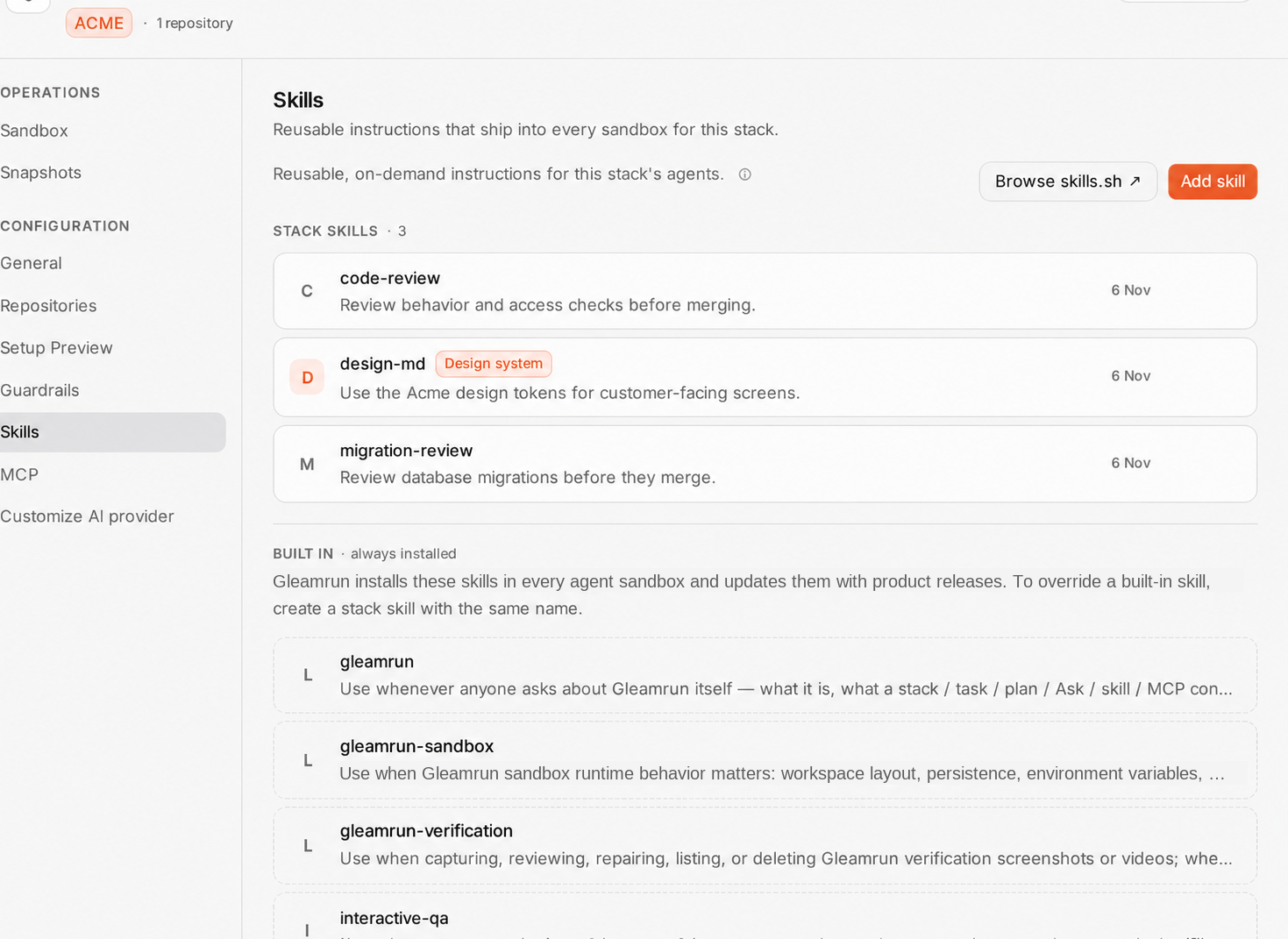
- Click Add skill
In Write your own, enter a Name of up to 80 characters. Gleamrun lowercases and hyphenates it for the skill's folder name. Use Description to tell the agent when to load the skill, within 1,024 characters. Add the Markdown body in Instructions (SKILL.md). You can start with an example skill.
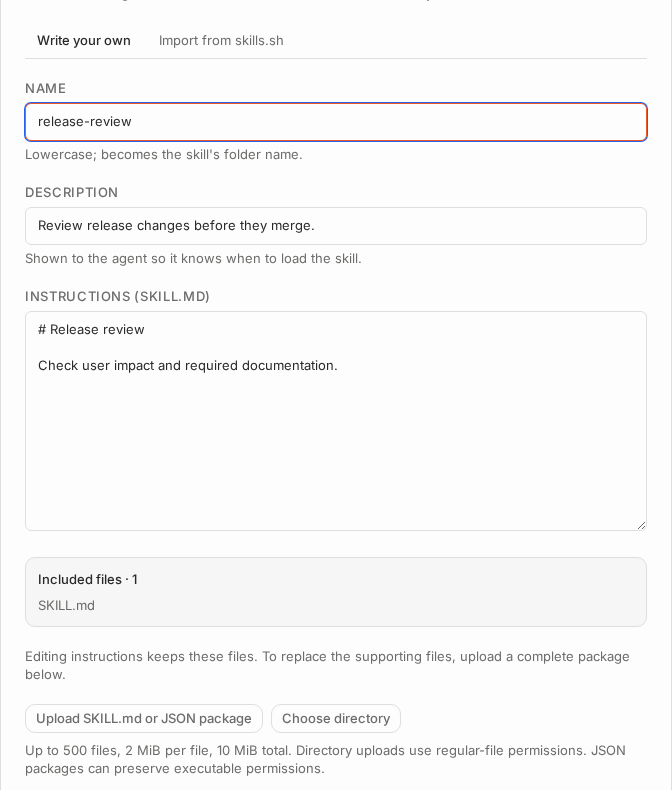
Write your own: the description is the load trigger. - Or import from skills.sh
Open Browse skills.sh in the Skills tab header to find a community skill. Paste its skills.sh link or
owner/repo/skillreference into Import from skills.sh. Select Preview package to inspect the files and source commit. Select Install package to save them.Imports keep the complete selected directory, including nested references, scripts, and binary assets. GitHub links retain the selected branch, tag, or commit. Sandboxes use the saved package without fetching it again.
Use Choose directory to upload a folder containing
SKILL.md, or Upload SKILL.md or JSON package for a single file or package. Packages accept up to 500 files, 2 MiB per file, and 10 MiB total. Paths must remain relative to the skill directory. Links and submodules are rejected.A JSON package is an array of files with
path,contentBase64, and optionalmodefields. IncludeSKILL.mdat the root. Use mode493for executable files (0755) and420for regular files (0644). Directory uploads use 0644 because browsers do not expose executable permissions. Editing instructions keeps the existing supporting files. Upload a replacement package or remove individual files in the skill editor.Bundled scripts and runtime toolsImporting a skill never executes its scripts or installs dependencies. Bundled code is available in the sandbox, but scripts may require external runtimes and tools. For example, Cursor's statechart package includes its launcher and TypeScript modules, but requires a TypeScript runtime, mise, TLC, and Java. - Save the skill
New and edited stack skills apply when you start a session or send the next message to a running session. A turn already in progress keeps its current instructions. Removed supporting files disappear on the next successful synchronization.
Skills from your repositories
Gleamrun discovers <name>/SKILL.md packages under .agents/skills/, .claude/skills/, and .codex/skills/ in your repositories during stack snapshot builds. It lists them read-only under From member repos in the Skills tab.
- Edited through pull requests: the skill lives beside the code it describes. The repository's owners review it. It applies to both Gleamrun agents and local Claude Code.
- Refreshed at sandbox rebuild: the Skills tab lists repo skills as of the last snapshot build, so press Rebuild on the stack's Snapshots page to pick up new ones.
- Same name, one package: a stack skill overrides a repository skill with the same name. A repository skill overrides a built-in skill. Use different names when you need both packages available.
On top of both, every sandbox gets the skills Gleamrun maintains, listed under Built in:
- Gleamrun: agents answer product questions from our actual vocabulary.
- Gleamrun-sandbox: the runtime agents execute in.
- Gleamrun-verification: how to capture and keep the screenshots and videos a reviewer sees.
- qa-agent: discovers coverage within your chosen scope and helps set up
your QA programme. It keeps a YAML profile at
Gleamrun/qa/qa-profile.yml, typed by the QA profile JSON Schema. On a task, it includes the file in the task's pull request. In a read-only session, it proposes a QA profile task to write the file.The profile records the harness, deterministic test setup, role sign-in methods, and lessons learned during runs. Keep test specs in the end-to-end catalog, planned work in QA flow tasks, and results in each run's report. A catalog entry does not mean a test passed. Describe personas, areas, flows, priorities, and exclusions in plain language to add them. You can also request a catalog of browser, API, unit, and manual tests.
In a read-only session, the skill first pins the session and names it QA Agent. Setup does not catalog end-to-end specs. After the profile merges, the skill asks whether to create a Catalog E2E task with qa-catalog-tests and whether to plan coverage with qa-create.
- qa-profile: reads, creates or updates the QA profile on its own, for
example to record a quirk a run found. It checks the file against the schema before it is
saved. On a task it writes the file. In a read-only session it proposes or updates the QA profile task. Every other QA Agent skill uses it to read the profile and to
write lessons back. If your stack has an older managed skill named
qa-engineer-profile, agents read it only to move its content into the file. Delete it after the file is merged. - qa-catalog-tests: commits an HTML catalog listing every end-to-end spec, the config that collects it, its CI coverage, and its measured duration. The skill reports missing durations as gaps and does not run tests to measure them. A separate history file retains every measured run time. The catalog charts weekly times by config and spec, and flags slower specs. The skill then proposes a weekly automation to update both files and open a pull request when they change. In a read-only session, it proposes a Catalog E2E task instead.
- qa-create: discovers gaps, refines the catalog, or proposes work
for missing coverage. It pauses after each stage: scope, roles, matrix, design, and review
of drafted cards. Scope identifies the suite and request size: a fixed-bug regression, one
test, a small batch, or a full sweep. The skill asks relevant questions and skips unneeded
stages. A full sweep also settles goals, areas, output, CI time budget, flake tolerance,
and maintainers.
Roles confirms code-verified roles, personas, and fixtures. Matrix ranks flows by value and risk, then selects allowed and denied cases. Design sets each flow's test level, preconditions, determinism, locators, assertions, edge cases, cleanup, and flake risks. It recommends an API or unit test when that proves the contract at lower cost, but you can retain the end-to-end test. Invoke qa-create again to repeat a stage, such as redesigning one flow. It reuses existing tests and task links.
Discovery and catalog-only requests create no coding tasks and run no tests. New automated QA-flow tasks add permanent specs with videos and apply qa-incidental-inspection without changing application code. Planned flows identify any missing permissions, fixtures, or routes.
- qa-run: runs the requested, supported QA-flow specs and uploads a
video for each flow. One report Page records flow results, failure classifications and
remedies, with incidental findings listed separately. The skill never changes application
code or flow steps. It may repair minor test drift, such as a renamed label, incorrect test
ID, or click before the page was ready. It submits those repairs in one pull request. Use
repairs: offto prevent spec edits. - qa-optimize-tests: finds end-to-end tests with repeated setup, steps, and assertions. It proposes one task per group to combine them into a single test that retains every assertion and finishes within 30 seconds. The skill itself runs no tests. Each proposed task measures its result and does not commit an over-budget test.
- create-Gleamrun-page: publishes one self-contained HTML page, served from the sandbox's own page host and never committed, when a user asks for one or a review skill finishes. The page lands in the task's Pages section to read, open live, or download as HTML or PDF. See the Page rule.
- verification, visual-verification, logic-verification, expect-verification, entity-verification and data-model-verification: the verification family every task runs, with Gleamrun-verification as its shared reference. See Verification skills.
- verification-review: the review skill, which adds one Page to the same
verification. It replaces qa-review and the per-family
*-qa-reviewskills; the old names still resolve to it. - task-driver: drives a set of tasks to completion from one session. It creates proposed tasks, plans merge order, turns on auto-merge at each task's merge turn unless you opt out, and keeps one Task Driver Dashboard Page current.
- review-skill-builder, risk-review-skill-builder, conventions-review-skill-builder and frontend-review-skill-builder:
scan your codebase, interview you, and generate stack-specific pull request review skills
(
risk-review,conventions-review,frontend-review). They build the reviewers; they do not grade pull requests themselves. - task-session-guidance: reference for task sessions, such as recaps, agent memory and preferences, skill authoring, and Telegram delivery.
- generate-findings and asd-ste100: sub-skills of every review skill. generate-findings gives every finding one severity (Critical, High, Medium or Low) and one shape, and merges sub-skills' findings. asd-ste100 writes the findings and the Page in plain, simplified English.
QA workspace view (beta)
Enable QA in User Settings → Beta to show the sidebar entry. Choose a stack to see its QA profile, QA Agent thread, test catalog, and related tasks. The page can start QA skills in a new Ask session on Home and run selected groups from the catalog. A catalog entry does not mean the test passed.
Steer your QA programme
Use ordinary language with /qa-agent or /qa-create. You can combine these requests:
- Discover: “Discover gaps in sign-in for guests only. Exclude billing. No tasks yet.”
- Create custom: “Add a field technician persona and an offline-sync area. Plan a flow that queues an edit offline and confirms it after reconnecting. Record any missing setup.”
- Catalog only: “Catalog our existing browser, API, unit and manual sign-in checks. Keep their runners and do not create tasks or run them.”
- Mixed: “Catalog existing invite coverage, then propose only the missing expired-invite flow.”
/qa-create pauses after each stage with numbered questions and recommended
defaults. Reply yes to accept that stage's defaults, or answer individual
items, such as “2: drop billing”. Unanswered items keep their default. Reply yes to all to accept every remaining default and receive the cards in one pass.
Before creating cards, the skill presents the drafts as one batch with the same response choices. An automation with nobody in the thread uses yes to all and lists its assumptions.
On later passes, the proposed profile preserves your custom entries, exclusions, priorities and task or evidence links. Accept the profile card to save it. Running tests and scheduling automation each need a separate request.
Built-in skills update whenever Gleamrun ships. To replace one, write a stack skill with the same name; the built-in then shows an Overridden badge.
Verification skills
The verification family stores evidence for a branch's changes in the task's verification set. The task prompt runs verification on every task. It does not publish a Page. The review family runs the same verification and collects the results in one additional Page.
VERIFICATION FAMILY (verification set only, never a Page)
/verification                      entry point: diff, routing, report
├── /visual-verification
├── /logic-verification
│   └── /data-model-verification
├── /entity-verification
└── /expect-verification

REVIEW (one Page per run)
/verification-review [visual|logic|expect|entity]
                                   = /verification routing + one Page

SHARED REFERENCE
/Gleamrun-verification          capture auth, failures, PNG registration,
                                   staleness, media, video delivery

Every *-review skill loads /generate-findings and /asd-ste100.- verification: reads the branch diff against its merge-base and runs visual-verification for UI the preview shows, logic-verification for changed logic, APIs and jobs, expect-verification for eligible external application UI, entity-verification for database schema changes, or a combination, every time. It owns the diff, the routing table and the final report.
- visual-verification: keeps the screenshots and videos current, re-shoots stale views and deletes ones that no longer exist. It plans every view and prefers a screenshot unless motion or a transient state is the evidence.
- logic-verification: draws one Mermaid diagram for each changed flow and attaches its PNG to the task's verification set. Each diagram shows how the flow runs now. It marks added, removed, and changed steps, retaining removed steps in place. Each box names the changed files and their green/red line counts. The skill identifies supporting tests or runtime evidence and flags every flow that lacks evidence.
- expect-verification: for changed UI in an external application, such as Slack or Microsoft Teams, that the stack preview cannot show. Public visual references must support the appearance. It checks expectations against code and attaches referenced renders. Missing preview access alone does not qualify.
- entity-verification: for database schema changes. It attaches a colored PNG of tables and relationships to the verification set, explains migration evidence, and enables the task's schema-change icon. It does not publish a Page.
- data-model-verification: for changed data model shapes in any language or schema, such as types, enums, API schemas, or ORM models. It attaches a PNG tree of each model's current shape with added, removed, and changed fields marked. logic-verification runs it as a child step.
- Gleamrun-verification: the shared reference. It owns the evidence standards, capture auth and failure handling, PNG registration, staleness rules, media viewing and video delivery. Agents load it directly when they need one of those sections.
- verification-review: runs the verification families the diff calls for and
merges them into exactly one Page. Add a scope, such as
/verification-review visual, to review one family.
Which skills publish a Page
- The suffix: every skill whose name ends in
-reviewpublishes a Page when it finishes a run, with or without findings and with or without a pull request. - Opt-in: any other skill publishes only when its own instructions include a
Publish a Pagesection. Nothing else creates a Page unless a user asks for one. - Outermost publishes once: a review skill run inside another review skill or a review agent returns its findings to its parent instead of publishing. One run produces exactly one Page.
- One page per review-agent run: Gleamrun creates the review page when the agent submits its verdict. That page holds the merged findings, sub-skill results and evidence. The agent links it in its response. Neither the agent nor its sub-skills publish a separate summary Page.
- Same findings everywhere: every publisher rates findings with generate-findings and writes them with asd-ste100, so a Page, a review and a PR comment show the same severities.
-review, such as a correctness or security review,
now publish a Page when you run them on their own. Under a review agent they return their
findings for the single review page that Gleamrun creates from the submitted verdict.Example skills
Copy one into Add skill and swap in your stack's specifics.
Coding standards: the rules a senior engineer repeats in every review, applied before the PR instead of after it.
---
name: code-review-standards
description: Load before writing or changing any production code
  in this stack.
---

- Prefer editing existing components over creating new ones.
- Every new endpoint calls requireTaskAccess before returning
  data, including cached responses.
- Write Vitest unit tests next to the file under test.
- Never add a dependency without flagging it in the PR
  description.
Mechanical conventions: procedures with one right answer that the codebase alone does not reveal.
---
name: db-migrations
description: Use whenever a change touches the database schema
  or adds a migration.
---

- Edit schema.ts, then run "bun run db:generate". Never write
  SQL migration files by hand.
- Every new column needs a default or a backfill; deploys run
  before migrations finish.
- Destructive changes (drop, rename) ship in two releases:
  stop reading the column first, drop it later.
A design system: name a stack skill design-md and the planning
wizard uses it as the stack's design system, so plans and UI tasks start from your tokens and
components. The Skills tab badges it Design system.
---
name: design-md
description: The design system for this stack. Load for any
  UI or styling work.
---

- Colors and spacing come from tokens in src/styles/tokens.css.
  Never hard-code hex values.
- Buttons use the Button component with variant "primary" or
  "ghost". We have had three inconsistent button styles before;
  do not add a fourth.
- Empty states get an icon, one sentence, and a primary action.
How teams use skills
- Standards on every run: the second time you leave the same review comment, add it as a line in a stack skill. Every agent on the stack then follows it, whoever wrote the prompt.
- Runbooks for Chat: an incident-triage skill (check the error tracker first, correlate with the latest deploy, end with a proposed fix task) turns "what's broken?" in Chat or Slack into the same steps every time, especially with MCP Connectors like Sentry attached.
- The agent ignored it: a vague Description never matches the work. Rewrite it as a trigger, or type / and insert the skill by name.
- Your edit changed nothing: send a new message after the edit. Stack skills refresh before the next turn, not during a turn already in progress. If synchronization fails, start a new session.
- A repo skill is missing: the Skills tab lists repo skills discovered at the last snapshot build. Press Rebuild on the stack's Snapshots page to pick up new ones.
- You can't reach the Skills tab: any workspace member can author and edit stack skills, but you must be a member of the workspace that owns the stack. If the tab is missing, you're not a member yet. Ask an owner or admin to add you.
Related
- Agents & Previews: the sessions your skills load into.
- Plans: where a
design-mdskill shapes proposed screens. - Steering Agents Together: the session message box you type / into.