

Working as a Team
Review & Merge
Review agent work, resolve blocking issues, and merge when the change is ready.
The Review Hub
Every task has a Review Hub tab. Once its pull request exists, open the tab to review:
- Automated checks (your existing CI) and bot reviews.
- Teammates' comments.
- A readiness light: red means a check failed or the branch has a merge conflict. Yellow means checks are running or comments remain unaddressed. Green reads Ready to merge when nothing blocks the merge. Otherwise, the card names the next action. The light dims while an agent works. Merged and closed pull requests show their state instead of a color.
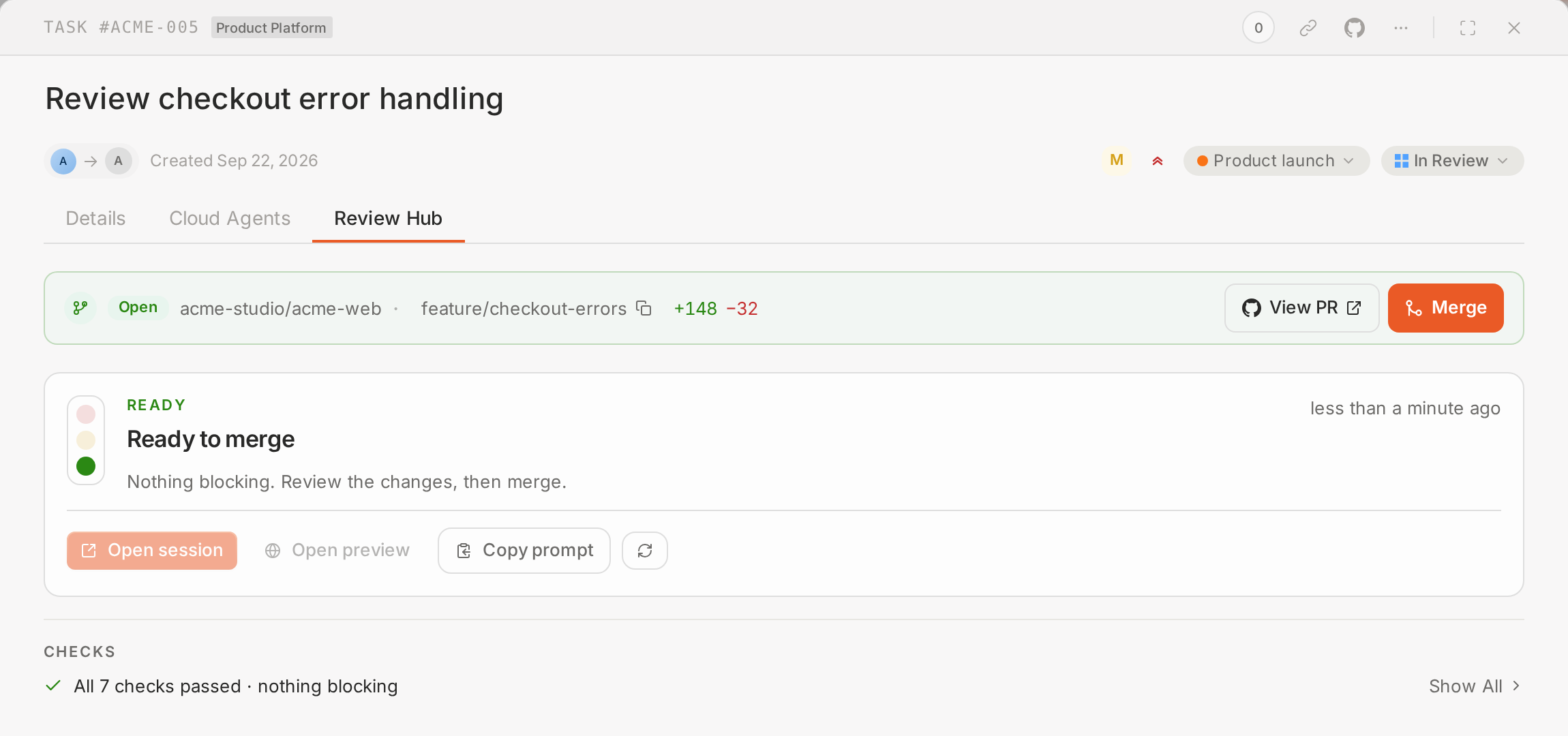
The summary separates branch, checks, and findings requirements. Open a requirement to see the evidence and next action. The checks count shows completed checks out of the total. On GitHub pull requests, the refresh control reads the latest provider state. Mark ready removes the pull request’s draft state at the provider.
To request a fix, send the agent a follow-up from the review. It makes the change on the same task, then the checks run again. Open a verification screenshot or report to annotate it for the follow-up. The follow-up composer also accepts skills. In the follow-up dialog, use Resolve on a finding that needs no further change, and add an optional comment. On GitHub, Gleamrun also resolves the review thread or comment there and posts who resolved it.
Roles
| Role | What it means |
|---|---|
| Owner / Admin | Everything, plus team management and setup (repositories, previews, guardrails). |
| Member | Create tasks and plans, run and steer agents, review, and merge. |
| Member (No Merge Permission) | Everything above, except merging. |
For mission-critical products, we recommend that a different person review the builder's work.
The merge checklist
- The requester tested the preview and says it does what they asked.
- Checks are green and the readiness light is not red.
- A person with merge rights skims the change and presses Merge.
While the merge runs, the button reads Merging. A pull request that waits in the repository's merge queue shows In merge queue.
After merge, the change is on the base branch. Deployment follows your repository's own pipeline. Multi-repository tasks become Done when at least one PR merges and every other linked PR is merged or closed.
Review the change before you merge it or enable auto-merge. Auto-merge can merge as soon as the merge rules pass.
Required review agents
A workspace rule can require a review agent before you merge. The Review Hub marks that review Required. Run it and address blocking findings before merging. A rule can require a fresh review after new commits. Owners and admins configure the rule for each stack under Workspace Settings to Role permissions. When a merge agent waits for a required review that has not run on the latest commit, is out of date, or failed, Gleamrun starts it.
Choose the Review model there for the stack’s review agents. Reviews always use workspace credits. To avoid using the coding model for review, enable Ensure the review agent model is different from the coding agent model and choose a Backup model. The backup runs when the known coding model matches the review model.
Merge policy
When a workspace runs one policy for every stack, owners and admins see Merge policy in place of Role permissions. Configure it on two tabs, each with its own Save changes:
- Policies: set rules for Everybody, then expand it to override them for a role or a person. Pick a Review agent, the finding severities that block a merge, and whether New commits need a fresh review. The most specific row that picks a review agent decides the agent and New commits; blocked severities add up across rows. Ask before PR makes the agent ask the person it works for before it opens a pull request.
- Review agents: choose the Review model and an optional Backup model that runs when the coding agent used the review model, and add or edit each stack's review agents.
By default, Everybody requires no review agent and blocks Critical and High findings. A pull request follows the policy of the person whose agent session opened it, or else the task's creator.
Let the merge agent merge a pull request
A person with merge permission can hand a task's pull requests to its merge agent: turn on auto-merge for the task. Each pull request gets its own merge run. One merge agent per task works every run.
The merge agent rebases the branch, repairs conflicts and failing checks, and pushes its fixes. It then requests a merge from Gleamrun. Every rule below must pass. If a rule blocks the merge, the pull request bar identifies it. External blockers can put the run into a wait until their state changes. See Why nothing has merged yet.
- The coding session is idle. No merge happens while the task's coding session runs or has a queued turn.
- Stack pull requests merge in link order. Each pull request waits for earlier linked, open pull requests to merge. Closed pull requests leave the order.
- CI has settled. No check may still run or fail. At least one must pass, unless Gleamrun verifies that CI is not required and zero or skipped-only checks remain unchanged for five minutes. The provider must name no other blocker.
- The pull request is not a draft and has no conflicts.
A run ends when its pull request merges or closes, the agent gives up, or someone presses Stop. Stop turns off auto-merge for the task and stops its merge runs. If the agent gives up, Gleamrun notifies the run's owners and shows the reason in the pull request bar.
The merge agent repairs conflicts and CI failures in tests, type checks, lint, and builds by default. Blocking review findings remain for a person or the coding agent unless the person who starts the merge run enables automatic finding fixes. That personal setting sends all unresolved findings after checks finish. See Finding fixes and alerts.
Branch protection, required checks, required review agents and merge queues still apply. The merge agent does not approve its own work or bypass a protected branch.
Book a session with us.
Enterprise plans include a team-wide training session, and live help for tasks on your
board.
Next
- Many Tasks, One Base: learn why merge order matters.
- A Day on the Board: see the workflow in practice.